Showing posts with label new. Show all posts

Open in new window option on right click

  • Go to Start >> Run.
  • Type regedit to open Registry Editor.
  • Before doing the following trick, take a back-up of your registry for safety.
  • Now navigate to HKEY_CLASSES_ROOT >> Directory >> shell
  • Create a new key i.e. Right-click on shell Select New >> Key and name it as "Open in new Window" without double quotes


  • Now, Right-click on the key which you have created now and create a sub key with the name "command"
  • Now, On the right pane, double click Default and enter value explorer %1.
  • Now you can see new window option on right-click on any folder.
  • To make this option available for your drives, perform the same procedure on HKEY_CLASSES_ROOT >> Drive >> shell.
  • To undo this trick, simply remove the keys which you have created.
Read More..

New ways to add Reminders in Inbox by Gmail


Last week, Inbox by Gmail opened up and improved many of your favorite features, including two new ways to add Reminders.

First up, when someone emails you a to-do, Inbox can now suggest adding a Reminder so you don’t forget. Heres how it looks if your spouse emails you and asks you to buy milk on the way home:
To help you add Reminders, the Google Research team used natural language understanding technology to teach Inbox to recognize to-dos in email.
And much like Gmail and Inbox get better when you report spam, your feedback helps improve these suggested Reminders. You can accept or reject them with a single click:
The other new way to add Reminders in Inbox is to create Reminders in Google Keep--they will appear in Inbox with a link back to the full note in Google Keep.
Hopefully, this little extra help gets you back to what matters more quickly and easily. Try the new features out, and as always, let us know what you think using the feedback link in the app.
Read More..

Happy New Year

Confused? Well today is Matariki, the M?ori New Year. Matariki is the M?ori name for the constellation of stars that other cultures call the Pleiades or the Seven Sister. Today the constellation first rises above the horizon just before dawn. Of course its also reasonably close to the winter solstice (in the Souther hemisphere) and so makes a natural way of marking the end of one year and the start of a new year. There are lots of information, resources online and events to celebrate the occasion. 


from The Universal Machine http://universal-machine.blogspot.com/

IFTTT

Put the internet to work for you.

Delete or edit this Recipe

Read More..

Double click on a drive opens in new window

Problem:
When i double-click on a drive, it opens in new window. What is the problem, Is it because of a virus. Please help me.

Solution:
  • Open any explorer window, Click on Tools >> Folder options >> View.
  • Click on restore defaults.
If this does not solve your problem the it may be because of a virus attack.
You can perform the following steps to get rid of this.

Solution 1
  1. Open start menu and click Run.
  2. Type regsvr32 /i shell32.dll
  3. Click Ok and if this message shows “DllRegisterServer and DllInstall in shell32.dll succeeded” that means the problem is solved.

Solution 2
  1. In Run type regedit.exe to open the registry editor.
  2. Traverse to HKEY_CLASSES_ROOT/Directory/Shell
  3. Double click on the default value on right and set it as “none”.
  4. Repeat the procedure for the key HKEY_CLASSES_ROOT/Drive/Shell.

Solution 3
Alternatively, you can download a registry file and merge it with your registry by double clocking it. Reboot your system after merging the file.
One of the methods listed above will definitely solve your problem.
Read More..

New Stuff

Hi Everybody!

We have a new page called Student Work with sides shows of student projects created on the computer. Check it out!

We also have a new Donors Choose project posted. We are raising money to buy digital frames so we can display student work in school in a slide show just like on the new page. Click on the link below to go to Ms. Bransons Donors Choose site to donate to our project.

http://www.donorschoose.org/ms.branson
Read More..

What does Privacy Mean to New Zealanders in the Internet Age

This Thursday is the 1st lecture in the annual Gibbons Memorial lecture series. The first lecture is by Professor Miriam Lips of the School of Government, Victoria University of Wellington, titled: What does Privacy Mean to New Zealanders in the Internet Age?

When: 6pm (refreshments) for 6.30pm lecture start, Thursday 1st May, 2014
Where: Owen G Glenn Building, Room OGGB3/260-092
Note that there is public parking in the basement of the Owen G Glenn Building at 12 Grafton Road.

Miriam Lips is the first Professor of E-Government at Victoria University of Wellington. This chair is sponsored by industry - Datacom System, FX Networks, Microsoft New Zealand – and the NZ government - the State Services Commission and the Department of Internal Affairs.

Professor Lips holds a MSc and a PhD from Erasmus University Rotterdam and an EMPA from Erasmus University, Leiden University and the Hochschule für Verwaltungswissen-schaften, Speyer. She has held academic positions at the University of Oxford and Tilburg University. Her current research includes management of online identity, use of social media for public engagement, the use of e-campaigning and the use of new media in disaster management.

Synopsis: Based on a 2013 survey with a representative sample of the New Zealand population, this talk will explore how, and to what extent, different groups of the New Zealand population are disclosing and protecting their personal information in varying online relationships with the private sector, government, and family and friends through social networking. The meaning of privacy for people from different age groups, ethnicities, educational backgrounds, and income groups will be discussed, and the implications for a population which increasingly exchanges their identity information online, against the backdrop of new privacy challenges and risks emerging from the use of Big Data.

from The Universal Machine http://universal-machine.blogspot.com/

IFTTT

Put the internet to work for you.

via Personal Recipe 895909

Read More..

New Research Challenges in Language Understanding


We held the first global Language Understanding and Knowledge Discovery Focused Faculty Workshop in Nanjing, China, on November 14-15, 2013. Thirty-four faculty members joined the workshop arriving from 10 countries and regions across APAC, EMEA and the US. Googlers from Research, Engineering and University Relations/University Programs also attended the event.

The 2-day workshop included keynote talks, panel discussions and break-out sessions [agenda]. It was an engaging and productive workshop, and we saw lots of positive interactions among the attendees. The workshop encouraged communication between Google and faculty around the world working in these areas.

Research in text mining continues to explore open questions relating to entity annotation, relation extraction, and more. The workshop’s goal was to brainstorm and discuss relevant topics to further investigate these areas. Ultimately, this research should help provide users search results that are much more relevant to them.

At the end of the workshop, participants identified four topics representing challenges and opportunities for further exploration in Language Understanding and Knowledge Discovery:

  • Knowledge representation, integration, and maintenance
  • Efficient and scalable infrastructure and algorithms for inferencing
  • Presentation and explanation of knowledge
  • Multilingual computation

Going forward, Google will be collaborating with academic researchers on a position paper related to these topics. We also welcome faculty interested in contributing to further research in this area to submit a proposal to the Faculty Research Awards program. Faculty Research Awards are one-year grants to researchers working in areas of mutual interest.

The faculty attendees responded positively to the focused workshop format, as it allowed time to go in depth into important and timely research questions. Encouraged by their feedback, we are considering similar workshops on other topics in the future.
Read More..

How to remove New Folder exe Virus manually or using software

New Folder.exe Virus
New Folder.exe virus mostly spread through the USB drive. It cannot be deleted normally. Here are the steps to remove this virus easily
  1. Find out all the locations of the “newfolder.exe” virus.
  2. Open the task manager and end the newfolder.exe process running in background.
  3. Open cmd and then type “dir /a XXX” where XXX is the name of the folder where the virus is.
  4. Then type “cd XXX”.
  5. Delete the file by typing “del name_of_file”.
  6. Then remove the whole folder by typing “rmdir /s XXX”.
  7. The virus has been removed just see the task manager once again and end the newfolder.exe process running in the background (if any).
  8. Restart the system.
There is also a software utility available for this purpose. Click to download
Run this software in safe mode to remove the virus easily.
Read More..

Google Databoard A new way to explore industry research


It’s important for people to stay up to date about the most recent research and insights related to their work or personal lives. But it can be difficult to keep up with all the new studies and updated data that’s out there. To make life a bit easier, we’re introducing a new take on how research can be presented. The Databoard for Research Insights enables people to explore and interact with some of Google’s recent research in a unique and immersive way. The Databoard uses responsive design to to offer an engaging experience across devices. Additionally, the tool is a new venture into data visualization and shareability with bite-sized charts and stats that can be shared with your friends or coworkers. The Databoard is currently home to several of Google’s market research studies for businesses, but we believe that this way of conveying data can work across all forms of research.


Here are some of the things that make the Databoard different from other ways research is released today:

Easy to use
All of the information in the Databoard is presented in a bite-sized way so that you can quickly find relevant information. You can explore an entire study or jump straight to the topics or data points you care about. The Databoard is also optimized for all devices so you can explore the research on your computer, tablet or smartphone.

Meant to be shared
Most people, when they find a compelling piece of data, want to share it! Whether it’s with a colleague, client, or a community on a blog or social network, compelling insights and data are meant to be shared. With the databoard, you can easily share individual charts and insights or collections of data with anyone through email or social networks, just look for the share button at the top of each chart or insight.

Create a cohesive story
Most research studies set out to answer a specific question, like how people use their smartphones in stores, or how a specific type of consumer shops. This means that businesses need to look across multiple pieces of research to craft a comprehensive business or marketing strategy. With this in mind, the Databoard lets you curate a customized infographic out of the charts or data points you find important across multiple Google research studies. Creating an infographic is quick and easy, and you can share the finished product with your friends or colleagues.

The databoard is currently home to six research studies including The New Multi-screen World, Mobile In-store shopper research and Mobile search moments. New studies will be added frequently. To get started creating your own infographic, visit the Databoard now.
Read More..

New Zealands Great Walks added to Google Maps

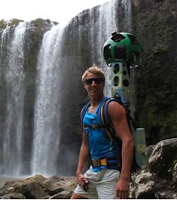
If youve always wanted to walk one of New Zealands classic walks now you can without even breaking a sweat. Google has added several classic NZ walks, such as the Milford Track, to Google street view within Google Ma ps. This was reported in the New Zealand Herald last week.

from The Universal Machine http://universal-machine.blogspot.com/

IFTTT

Put the internet to work for you.

Turn off or edit this Recipe

Read More..

Teaching machines to read between the lines and a new corpus with entity salience annotations


Language understanding systems are largely trained on freely available data, such as the Penn Treebank, perhaps the most widely used linguistic resource ever created. We have previously released lots of linguistic data ourselves, to contribute to the language understanding community as well as encourage further research into these areas.

Now, we’re releasing a new dataset, based on another great resource: the New York Times Annotated Corpus, a set of 1.8 million articles spanning 20 years. 600,000 articles in the NYTimes Corpus have hand-written summaries, and more than 1.5 million of them are tagged with people, places, and organizations mentioned in the article. The Times encourages use of the metadata for all kinds of things, and has set up a forum to discuss related research.

We recently used this corpus to study a topic called “entity salience”. To understand salience, consider: how do you know what a news article or a web page is about? Reading comes pretty easily to people -- we can quickly identify the places or things or people most central to a piece of text. But how might we teach a machine to perform this same task? This problem is a key step towards being able to read and understand an article.

One way to approach the problem is to look for words that appear more often than their ordinary rates. For example, if you see the word “coach” 5 times in a 581 word article, and compare that to the usual frequency of “coach” -- more like 5 in 330,000 words -- you have reason to suspect the article has something to do with coaching. The term “basketball” is even more extreme, appearing 150,000 times more often than usual. This is the idea of the famous TFIDF, long used to index web pages.
Congratulations to Becky Hammon, first female NBA coach! Image via Wikipedia.
Term ratios are a start, but we can do better. Search indexing these days is much more involved, using for example the distances between pairs of words on a page to capture their relatedness. Now, with the Knowledge Graph, we are beginning to think in terms of entities and relations rather than keywords. “Basketball” is more than a string of characters; it is a reference to something in the real word which we already already know quite a bit about.

Background information about entities ought to help us decide which of them are most salient. After all, an article’s author assumes her readers have some general understanding of the world, and probably a bit about sports too. Using background knowledge, we might be able to infer that the WNBA is a salient entity in the Becky Hammon article even though it only appears once.

To encourage research on leveraging background information, we are releasing a large dataset of annotations to accompany the New York Times Annotated Corpus, including resolved Freebase entity IDs and labels indicating which entities are salient. The salience annotations are determined by automatically aligning entities in the document with entities in accompanying human-written abstracts. Details of the salience annotations and some baseline results are described in our recent paper: A New Entity Salience Task with Millions of Training Examples (Jesse Dunietz and Dan Gillick).

Since our entity resolver works better for named entities like WNBA than for nominals like “coach” (this is the notoriously difficult word sense disambiguation problem, which we’ve previously touched on), the annotations are limited to names.

Below is sample output for a document. The first line contains the NYT document ID and the headline; each subsequent line includes an entity index, an indicator for salience, the mention count for this entity in the document as determined by our coreference system, the text of the first mention of the entity, the byte offsets (start and end) for the first mention of the entity, and the resolved Freebase MID.
Features like mention count and document positioning give reasonable salience predictions. But because they only describe what’s explicitly in the document, we expect a system that uses background information to expose what’s implicit could give better results.

Download the data directly from Google Drive, or visit the project home page with more information at our Google Code site. We look forward to seeing what you come up with!
Read More..

Robotic musicians in New Zealand

Radio New Zealand National recently broadcast an interview with Prof. Dale Carnegie the head of Victoria Universitys School of Engineering and Computer Science. Amongst other research his group have been collaborating with the School of Music to design and build robotic musicians that play specially designed instruments. The really interesting thing is that these "musicians"  are not limited by human physiology; they can play faster than a person, they can play chords a human hand couldnt physically span and of course they can play longer. You can see a video of a robotic bass performing a cover of Hysteria by Muse. I have some friends who are bass players who will love/hate this!


from The Universal Machine http://universal-machine.blogspot.com/

IFTTT

Put the internet to work for you.

Delete or edit this Recipe

Read More..

Techvana the New Zealand Computer Museum is now open!

We have a new computer museum! The  project to create the Techvana  computer museum in Auckland is making good progress. The museum has occupied its premises at 105 Cook Street, Auckland and for the near future is open from 12 to 5 on weekends. Visitors are most welcome.
The museum is built around the collection of Mark and Katie Barlow – much of their collection is on display. Many of the computers and game-machines are in working order and may be tried-out.


from The Universal Machine http://universal-machine.blogspot.com/

IFTTT

Put the internet to work for you.

Turn off or edit this Recipe

Read More..

Google Flu Trends gets a brand new engine


Each year the flu kills thousands of people and affects millions around the world. So it’s important that public health officials and health professionals learn about outbreaks as quickly as possible. In 2008 we launched Google Flu Trends in the U.S., using aggregate web searches to indicate when and where influenza was striking in real time. These models nicely complement other survey systems—they’re more fine-grained geographically, and they’re typically more immediate, up to 1-2 weeks ahead of traditional methods such as the CDC’s official reports. They can also be incredibly helpful for countries that don’t have official flu tracking. Since launching, we’ve expanded Flu Trends to cover 29 countries, and launched Dengue Trends in 10 countries.

The original model performed surprisingly well despite its simplicity. It was retrained just once per year, and typically used only the 50 to 300 queries that produced the best estimates for prior seasons. We then left it to perform through the new season and evaluated it at the end. It didn’t use the official CDC data for estimation during the season—only in the initial training.

In the 2012/2013 season, we significantly overpredicted compared to the CDC’s reported U.S. flu levels. We investigated and in the 2013/2014 season launched a retrained model (still using the original method). It performed within the historic range, but we wondered: could we do even better? Could we improve the accuracy significantly with a more robust model that learns continuously from official flu data?

So for the 2014/2015 season, we’re launching a new Flu Trends model in the U.S. that—like many of the best performing methods [1, 2, 3] in the literature—takes official CDC flu data into account as the flu season progresses. We’ll publish the details in a technical paper soon. We look forward to seeing how the new model performs in 2014/2015 and whether this method could be extended to other countries.

As we’ve said since 2009, "This system is not designed to be a replacement for traditional surveillance networks or supplant the need for laboratory-based diagnoses and surveillance." But we do hope it can help alert health professionals to outbreaks early, and in areas without traditional monitoring, and give us all better odds against the flu.

Stay healthy this season!
Read More..

Lens Blur in the new Google Camera app


One of the biggest advantages of SLR cameras over camera phones is the ability to achieve shallow depth of field and bokeh effects. Shallow depth of field makes the object of interest "pop" by bringing the foreground into focus and de-emphasizing the background. Achieving this optical effect has traditionally required a big lens and aperture, and therefore hasn’t been possible using the camera on your mobile phone or tablet.

That all changes with Lens Blur, a new mode in the Google Camera app. It lets you take a photo with a shallow depth of field using just your Android phone or tablet. Unlike a regular photo, Lens Blur lets you change the point or level of focus after the photo is taken. You can choose to make any object come into focus simply by tapping on it in the image. By changing the depth-of-field slider, you can simulate different aperture sizes, to achieve bokeh effects ranging from subtle to surreal (e.g., tilt-shift). The new image is rendered instantly, allowing you to see your changes in real time.

Lens Blur replaces the need for a large optical system with algorithms that simulate a larger lens and aperture. Instead of capturing a single photo, you move the camera in an upward sweep to capture a whole series of frames. From these photos, Lens Blur uses computer vision algorithms to create a 3D model of the world, estimating the depth (distance) to every point in the scene. Here’s an example -- on the left is a raw input photo, in the middle is a “depth map” where darker things are close and lighter things are far away, and on the right is the result blurred by distance:

Here’s how we do it. First, we pick out visual features in the scene and track them over time, across the series of images. Using computer vision algorithms known as Structure-from-Motion (SfM) and bundle adjustment, we compute the camera’s 3D position and orientation and the 3D positions of all those image features throughout the series.

Once we’ve got the 3D pose of each photo, we compute the depth of each pixel in the reference photo using Multi-View Stereo (MVS) algorithms. MVS works the way human stereo vision does: given the location of the same object in two different images, we can triangulate the 3D position of the object and compute the distance to it. How do we figure out which pixel in one image corresponds to a pixel in another image? MVS measures how similar they are -- on mobile devices, one particularly simple and efficient way is computing the Sum of Absolute Differences (SAD) of the RGB colors of the two pixels.

Now it’s an optimization problem: we try to build a depth map where all the corresponding pixels are most similar to each other. But that’s typically not a well-posed optimization problem -- you can get the same similarity score for different depth maps. To address this ambiguity, the optimization also incorporates assumptions about the 3D geometry of a scene, called a "prior,” that favors reasonable solutions. For example, you can often assume two pixels near each other are at a similar depth. Finally, we use Markov Random Field inference methods to solve the optimization problem.

Having computed the depth map, we can re-render the photo, blurring pixels by differing amounts depending on the pixel’s depth, aperture and location relative to the focal plane. The focal plane determines which pixels to blur, with the amount of blur increasing proportionally with the distance of each pixel to that focal plane. This is all achieved by simulating a physical lens using the thin lens approximation.

The algorithms used to create the 3D photo run entirely on the mobile device, and are closely related to the computer vision algorithms used in 3D mapping features like Google Maps Photo Tours and Google Earth. We hope you have fun with your bokeh experiments!
Read More..

eMachines D725 14 0 Inch Laptop LCD Screen NEW

eMachines D725 14.0 Inch Laptop LCD Screen NEW
Price: RM250

14.0 Inch HD LED Widescreen LCD Screen for notebook laptop,
14" HD LED backlight (16:9), Resolution: 1366 × 768

Example Fit model:

- eMachines D725 Laptop
- Other model of Acer, HP Compaq, Asus, Dell, BenQ, Lenovo, eMachines, MSI, Toshiba, Samsung and etc brand laptop.
condition: original brand new
Warranty: 3 months

Special price for more than 1 unit purchase.

# can delivered by cod or PosLaju. The package will be carefully packed.

==================================
contact: Mr Zul 0127319949
COD Area: Plentong, Masai, Pasir Gudang, Ulu Tiram,
------------ Johor Jaya, Taman Molek, Tebrau,
------------ or other area of Johor Bahru, or
------------ Segamat or Bandar Mas, Kota Tinggi Johor
Courier: by Pos Laju
Payment: Bank transfer or cash
Pos Laju Courier: + RM10

Dont forget to see my other ads.
==================================

Other services:
- Format or service laptop immediately at main area, other area can considered.
- Delivery at main area radius. other area can considered.
- Accept faulty, semi-faulty or used laptop.
- Laptop CPU Cooling Fan Services.


Read More..

Compaq V3000 DV2000 Laptop LCD Screen NEW RM300

Compaq V3000 DV2000 Laptop LCD Screen NEW -RM300


fits: Compaq Presario v3000, hp pavilion dv2000, etc

14.1 Inch Wide WXGA CrystalBrite LCD Screen for notebook laptop,

Example fit model:
- Compaq Presario V3000 CQ40 CQ45
- HP Pavilion DV2000

also fit for other HP Compaq model.

condition: brand new
Warranty: 3 months

# can delivered by cod or PosLaju. The package will be carefully packed.

======================================
contact: Mr Zul 0127319949
COD Area: Plentong, Masai, Pasir Gudang, Ulu Tiram, Johor Jaya, Taman Molek,
or other area of Johor Bahru [plus RM5], or
Segamat or Bandar Mas, Kota Tinggi Johor
Courier: by Pos Laju
Payment: Bank transfer or cash
Pos Laju Courier: + RM10

Dont forget to see my other ads.
======================================

Other services:
- Format or service laptop immediately at main area [free transportation], other area can considered.
- Free delivery at main area radius. other area can considered.
- accept faulty laptop or used laptop.
- Laptop CPU Cooling Fan Services.


Read More..

Acer Aspire 4310 4315 4710 4715Z Laptop Keyboard NEW


Price: RM120

Specification:
Layout: US
Letter: English
Colour: White
Remark: Ribbon cable included

Compatible Series Models:
Acer Aspire 4220, 4310, 4315, 4720Z, 4220G, 4920, 4920G, 5220, 4320, 5310, 4520, 5310G, 4520G, 5520, 4710, 5710, 4710G, 5710G, 4710G-4A0508 5720, 4715, 4715Z, 5720G, 4720, 5910, 4720G, 5920

Condition: Brand NEW
Warranty: 3 months
tested working.

Price can be nego for more than 1 unit.

==================================
contact: Mr Zul 0127319949
COD Area: Plentong, Masai, Pasir Gudang, Ulu Tiram,
------------ Johor Jaya, Taman Molek, Tebrau,
------------ or other area of Johor Bahru, or
------------ Segamat or Bandar Mas, Kota Tinggi Johor
Courier: by Pos Laju
Payment: Bank transfer or cash
Pos Laju Courier: + RM10

Dont forget to see my other ads.
==================================

Other services:
- Format or service laptop immediately at main area, other area can considered.
- Delivery at main area radius. other area can considered.
- Accept faulty, semi-faulty or used laptop.
- Laptop CPU Cooling Fan Services.
Read More..

Lenovo V470 B470 Laptop LCD Screen NEW

Lenovo V470 B470 Laptop LCD Screen NEW
Price: RM250

14.0 Inch HD LED Widescreen LCD Screen for notebook laptop,
14" HD LED backlight (16:9), Resolution: 1366 × 768

Example Fit model:

- Lenovo G455 G460 G470 V470 V470c B470 B470e B470g
- Other model of Acer, HP Compaq, Asus, Dell, BenQ, Lenovo, eMachines, MSI, Toshiba, Samsung and etc brand laptop.

condition: original brand new
Warranty: 3 months

Special price for more than 1 unit purchase.

# can delivered by cod or PosLaju. The package will be carefully packed.

==================================
contact: Mr Zul 0127319949
COD Area: Plentong, Masai, Pasir Gudang, Ulu Tiram,
------------ Johor Jaya, Taman Molek, Tebrau,
------------ or other area of Johor Bahru, or
------------ Segamat or Bandar Mas, Kota Tinggi Johor
Courier: by Pos Laju
Payment: Bank transfer or cash
Pos Laju Courier: + RM10

Dont forget to see my other ads.
==================================

Other services:
- Format or service laptop immediately at main area, other area can considered.
- Delivery at main area radius. other area can considered.
- Accept faulty, semi-faulty or used laptop.
- Laptop CPU Cooling Fan Services.


Read More..

Evangelion New Movie Making of

Evangelion New Movie Making of

Rebuild of EVANGELION 1.01
http://www.youtube.com/watch?v=fr2rt-kVij4


Rebuild of EVANGELION 2.02
Part 1: http://www.youtube.com/watch?v=uVdyKcY9Nqc


Part 2: http://www.youtube.com/watch?v=L_Cqvi0T0zo
Read More..