Showing posts with label keyboard. Show all posts

Mega Tutorial For Windows keyboard shortcuts

Mega Tutorial For Windows keyboard shortcuts


Alt + F File menu options in current program.
Alt + E Edit options in current program
Alt + Tab Switch between open programs
F1 Universal Help in almost every Windows program.
F2 Rename a selected file
F5 Refresh the current program window
Ctrl + N Create a new, blank document in some software programs
Ctrl + O Open a file in current software program
Ctrl + A Select all text.
Ctrl + B Change selected text to be Bold
Ctrl + I Change selected text to be in Italics
Ctrl + U Change selected text to be Underlined
Ctrl + F Open find window for current document or window.
Ctrl + S Save current document file.
Ctrl + X Cut selected item.
Shift + Del Cut selected item.
Ctrl + C Copy selected item.
Ctrl + Ins Copy selected item
Ctrl + V Paste
Shift + Ins Paste
Ctrl + K Insert hyperlink for selected text
Ctrl + P Print the current page or document.
Home Goes to beginning of current line.
Ctrl + Home Goes to beginning of document.
End Goes to end of current line.
Ctrl + End Goes to end of document.
Shift + Home Highlights from current position to beginning of line.
Shift + End Highlights from current position to end of line.
Ctrl + Left arrow Moves one word to the left at a time.
Ctrl + Right arrow Moves one word to the right at a time.
Ctrl + Esc Opens the START menu
Ctrl + Shift + Esc Opens Windows Task Manager
Alt + F4 Close the currently active program
Alt + Enter Open the Properties for the selected item (file, folder, shortcut, etc.)
Read More..

Rupee Font Use the Indian Rupee Symbol on Computer Keyboard

Rupee Font - Use the Indian Rupee Symbol on Computer Keyboard

Hi Everyone!!!
Few days back, i wrote about the proposed Unicode character code U+0971 be assigned for the new Rupee symbol

Today ill tell you how to use the Indian Rupee Symbol on keyboard using the Rupee Font.

First of all download the Indian Rupee Symbol Font File

Step 1:
Install the font.


Step 2:
Open MS Word change the font to Rupee Foundation


Step 3:
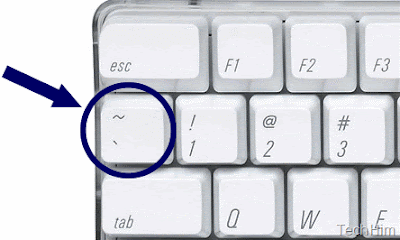
Press the tilde key on the Keyboard.


Thats it!!!
Now you can see the symbol on the Keyboard.


Read More..

Indian Rupee Symbol on keyboard

Indian Rupee Symbol on Keyboard


The Indian Government has proposed to the Unicode Consortium that the Unicode character code U+0971 be assigned for the new Rupee symbol. This was revealed in a presentation by D. Udaya Kumar who is is best known as the designer of our new currency symbol.

It may take several months for the Consortium to include the new symbol in the standard character set but once that is done, you should be able to type Rupee using the standard keyboard without requiring any special fonts.

For instance, Microsoft Word users can insert any Unicode character in a document by typing the character code followed by the Alt+x key. In the case of Rupee, they’ll have to type 0971 followed by Alt+x. Currently this combination will output an unused Devanagri character that the Indian government has proposed to replace with the new Rupee symbol.

Presentation on Indian Rupee Symbol


Read More..

Acer Aspire 4310 4315 4710 4715Z Laptop Keyboard NEW


Price: RM120

Specification:
Layout: US
Letter: English
Colour: White
Remark: Ribbon cable included

Compatible Series Models:
Acer Aspire 4220, 4310, 4315, 4720Z, 4220G, 4920, 4920G, 5220, 4320, 5310, 4520, 5310G, 4520G, 5520, 4710, 5710, 4710G, 5710G, 4710G-4A0508 5720, 4715, 4715Z, 5720G, 4720, 5910, 4720G, 5920

Condition: Brand NEW
Warranty: 3 months
tested working.

Price can be nego for more than 1 unit.

==================================
contact: Mr Zul 0127319949
COD Area: Plentong, Masai, Pasir Gudang, Ulu Tiram,
------------ Johor Jaya, Taman Molek, Tebrau,
------------ or other area of Johor Bahru, or
------------ Segamat or Bandar Mas, Kota Tinggi Johor
Courier: by Pos Laju
Payment: Bank transfer or cash
Pos Laju Courier: + RM10

Dont forget to see my other ads.
==================================

Other services:
- Format or service laptop immediately at main area, other area can considered.
- Delivery at main area radius. other area can considered.
- Accept faulty, semi-faulty or used laptop.
- Laptop CPU Cooling Fan Services.
Read More..