Trick to Show ur name after time in taskbar...


Hi freinds !
I m here to tell u a trick to add up ur name in place of AM and PM beside time and make urself to feel proud among ur group of frnds.
Its simple
Start -> Control Pannel -> Regional and LAnguage option -> Customize (beside English US) -> Go to TIME tab -> Change AM symbol and PM symbol from AM and PM to ur name -> Apply -> Ok ...
IS it changed ??? Might be not ...Now go to time in taskbar and Double Click it to open "Date and time property" ...Look place where time chnges in digital form i.e. 02:47:52 AM , click to arrow to cnage the AM or PM by selecting and press arrow. It will Show ur name or name that was entered by u, Apply -> OK and be HAPPY 8)
Read More..

Paper to Digital in 200 languages


Many of the world’s important sources of information - books, newspapers, magazines, pamphlets, and historical documents - are not digital. Unlike digital documents, these paper-based sources of information are difficult to search through or edit, or worse, completely inaccessible to some people. Part of the solution is scanning, getting a digital image of the page, but raw image pixels aren’t yet recognized as textual content from the computer’s point of view.

Optical Character Recognition (OCR) technology aims to turn pictures of text into computer text that can be indexed, searched, and edited. For some time, Google Drive has provided OCR capabilities. Recently, we expanded this state-of-the-art technology to support all of the world’s major languages - that’s over 200 languages in more than 25 writing systems. This technology is available to users in 2 easy steps:

1. Upload a scanned document in its current form (say, as an image or PDF). The example below shows a scanned document in Hindi uploaded to a user’s Drive account as a PNG.
2. Right-click on the document in the Drive interface, and select ‘Open with’ -> ‘Google Docs’.
This opens a Google document with the original image followed by the extracted text.
You don’t even need to specify which language the document is in; the system will determine that automatically. Or, you can use the Google Drive API for more explicit control over the language detection in documents. For example, here is an invocation of the Drive API in Python:
The OCR capability in Drive is also available in the Drive App for Android.

To make this possible, engineering teams across Google pursued an approach to OCR focused on broad language coverage, with a goal of designing an architecture that could potentially work with all existing languages and writing systems. We do this in part by using Hidden Markov Models (HMMs) to make sense of the input as a whole sequence, rather than first trying to break it apart into pieces. This is similar to how modern speech recognition systems recognize audio input.

OCR and speech recognition share some challenges - like dealing with background “noise,” different languages, and low-quality inputs. But some challenges are specific to OCR: the variety of typefaces, the different types of scanners and cameras, and the need to work on older material that may contain archaic orthographic and linguistic elements. In addition to utilizing HMMs, we leveraged many of the same technologies used in the Google Handwriting Input app to allow automatic learning of features and to give preference to more likely output, as well as minimum-error-rate training to allow effective combination of multiple sources of information, and modern methods in machine learning to minimize manual design and maximize use of data. We also take advantage of advances in internationalization and typesetting, by using synthetic data in our training.

Currently, the OCR works best on cleanly scanned, high-resolution documents in the most commonly used typefaces. We are working to improve performance on poor quality scans and challenging text layouts. Give it a try and let us know how it works for you.
Read More..

Windows 2012 Server Burn to USB

I am not a hardware guy. At all. For me, the on button is pushing the boundaries of things. So, to reinstall an OS is kind of tipping my toes into waters I am less than excited about. At this point, I am sure most people wonder, why in the world are you in IT then? Well, technically, I am more of a developer than an IT guy, but, thats an entirely different story. To try and get up to speed I grabbed my 2012 Hyper V .iso I logged onto MSDN, pulled down my x64 image to the laptop. Normally, this is where I would throw up my hands, pop open PowerShell and start exploring some random, impossible, but, fun scripting challenge. "Not this time," I told myself, "figure it out."

Thankfully Paul Thurrotts Supersite for Windows (a great site by the way) offered up this link:
Windows 8 Release Preview: Create DVD Or USB Setup Media
After reading through the post I downloaded the Windows 7 USB/DVD download tool. You can download this from the Microsoft Store at
Windows 7 USB/DVD download tool
Once downloaded I installed the tool, ran it and in four steps, and, perhaps 5 minutes, I had a USB stick with my 2012 install ready image. After having fought things like Nero and PEBuild and, and, and, and, finding something like this is a plain old God send. Now, in the next 20 minutes, Ill have my new, release build of Windows 2012 on my machine up and running to start building a working home test suite.
Read More..

The Computer Science Pipeline and Diversity Part 1 How did we get here


(Cross-posted on the Google for Education Blog)

For many years, the Computer Science industry has struggled with a pipeline problem. Since 2009, when the number of undergraduate computer science (CS) graduates hit a low mark, there have been many efforts to increase the supply to meet an ever-increasing demand. Despite these efforts, the projected demand over the next seven years is significant.
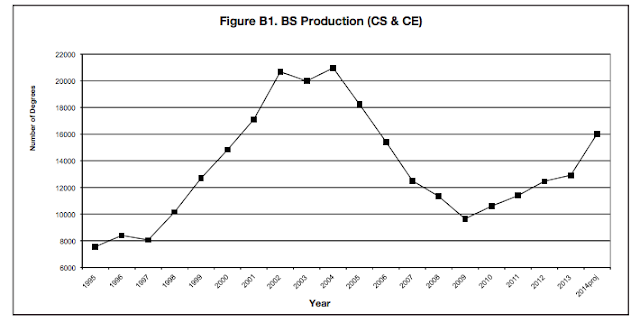
Source: 2013 Taulbee Survey, Computing Research Association
Even if we are able to sustain a positive growth in graduation rates over the next 7 years, we will only fill 30-40% of the available jobs.

“By 2022, the computer and mathematical occupations group is expected to yield more than 1.3 million job openings. However, unlike in most occupational groups, more job openings will stem from growth than from the need to replace workers who change occupations or leave the labor force.” -Bureau of Labor Statistics Occupational Projection Report, 2012.

More than 3 in 4 of these 1.3M jobs will require at least a Bachelor’s degree in CS or an Information Technology (IT) area. With our current production of only 16,000 CS undergraduates per year, we are way off the mark. Furthermore, within this too-small pipeline of CS graduates, is an even smaller supply of diverse - women and underrepresented minority (URM) - students. In 2013, only 14% of graduates were women and 20% URM. Why is this lack of representation important?
  • The workforce that creates technology should be representative of the people who use it, or there will be an inherent bias in design and interfaces.
  • If we get women and URMs involved, we will fill more than 30-40% of the projected jobs over the next 7 years.
  • Getting more women and URMs to choose computing occupations will reduce social inequity, since computing occupations are among the fastest-growing and pay the most.
Why are so few students interested in pursuing computing as a career, particularly women and URMs? How did we get here?

One fundamental reason is the lack of STEM (Science, Technology, Engineering and Mathematics) capabilities in our younger students. Over the last several years, international comparisons of K12 students’ performance in science and mathematics place the U.S. in the middle of the ranking or lower. On the National Assessment of Educational Progress, less than one-third of U.S. eighth graders show proficiency in science and mathematics. Lack of proficiency has led to lack of engagement in technical degree programs, which include CS and IT.

“In the United States, about 4% of all bachelor’s degrees awarded in 2008 were in engineering. This compares with about 19% throughout Asia and 31% in China specifically. In computer sciences, the number of bachelor’s and master’s degrees awarded decreased sharply from 2004 to 2007.”  -NSF: Higher Education in Science and Engineering.

The lack of proficiency has had a substantial impact on the overall number of students pursuing technical careers, but there have also been shifts resulting from trends and events in the technology sector that compound the issue. For example, we saw an increase in CS graduates from 1997 to the early 2000’s which reflected the growth of the dot-com bubble. Students, seeing the financial opportunities, moved increasingly toward technical degree programs. This continued until the collapse, after which a steady decrease occurred, perhaps as a result of disillusionment or caution.

Importantly, there are additional factors that are minimizing the diversity of individuals, particularly women, pursuing these fields. It’s important to note that there are no biological or cognitive reasons that justify a gender disparity in individuals participating in computing (Hyde 2006). With similar training and experience, women perform just as well as men in computer-related activities (Margolis 2003). But there can be important differences in reinforced predilections and interests during childhood that affect the diversity of those choosing to pursue computer science .

In general, most young boys build and explore; play with blocks, trains, etc.; and engage in activity and movement. For a typical boy, a computer can be the ultimate toy that allows him to pursue his interests, and this can develop into an intense passion early on. Many girls like to build, play with blocks, etc. too. For the most part, however, girls tend to prefer social interaction. Most girls develop an interest in computing later through social media and YouTubers, girl-focused games, or through math, science and computing courses. They typically do not develop the intense interest in computing at an early age like some boys do – they may never experience that level of interest (Margolis 2003).

Thus, some boys come into computing knowing more than girls because they have been doing it longer. This can cause many girls to lose confidence and drive during adolescence with the perception that technology is a man’s world - Both girls and boys perceive computing to be a largely masculine field (Mercier 2006). Furthermore, there are few role models at home, school or in the media changing the perception that computing is just not for girls. This overall lack of support and encouragement keeps many girls from considering computing as a career. (Google white paper 2014)

In addition, many teachers are oblivious to or support the gender stereotypes by assigning problems and projects that are oriented more toward boys, or are not of interest to girls. This lack of relevant curriculum is important. Many women who have pursued technology as a career cite relevant courses as critical to their decision (Liston 2008).

While gender differences exist with URM groups as well, there are compelling additional factors that affect them. Jane Margolis, a senior researcher at UCLA, did a study in 2000 resulting in the book Stuck in the Shallow End. She and her research group studied three very different high schools in Los Angeles, with different student demographics. The results of the study show that across all three schools, minority students do not get the same opportunities. While all of the students have access to basic technology courses (word processor, spreadsheet skills, etc.), advanced CS courses are typically only made available to students who, because of opportunities they already have outside school, need it less. Additionally, the best and most enthusiastic minority students can be effectively discouraged because of systemic and structural issues, and belief systems of teachers and administrators. The result is a small, mostly homogeneous group of students have all the opportunities and are introduced to CS, while the rest are relegated to the “shallow end of computing skills”, which perpetuates inequities and keeps minority students from pursuing computing careers.

These are some of the reasons why the pipeline for technical talent is so small and why the diversity pipeline is even smaller. Over the last two years, however, we are starting to see some positive signs.
  • Many students are becoming more aware of the relevance and accessibility of coding through campaigns such as Hour of Code and Made with Code.
  • This increase in awareness has helped to produce a steady increase in CS and IT graduates, and there’s every indication this growth will continue.
  • More opportunities to participate in CS-related activities are becoming available for girls and URMs, such as CS First, Technovation, Girls who Code, Black Girls Code, #YesWeCode, etc.
There’s much more that can be done to reinforce these positive trends, and to get more students of all types to pursue computing as a career. This is important not only to high tech, but is critical for our nation to compete globally. In the next post of this series, we will explore some of the positive steps that have been taken in increasing the diversity of graduates in Computer Science (CS) and Information Technology (IT) fields.
Read More..

Google Faculty Research Awards Summer 2015


We have just completed another round of the Google Faculty Research Awards, our annual open call for research proposals on Computer Science and related topics, including systems, machine learning, software engineering, security and mobile. Our grants cover tuition for a graduate student and provide both faculty and students the opportunity to work directly with Google researchers and engineers.

This round we received 805 proposals, about the same as last round, covering 48 countries on 6 continents. After expert reviews and committee discussions, we decided to fund 113 projects, with 27% of the funding awarded to universities outside the U.S. The subject areas that received the highest level of support were systems, machine perception, software engineering, and machine learning.

The Faculty Research Awards program plays a critical role in building and maintaining strong collaborations with top research faculty globally. These relationships allow us to keep a pulse on what’s happening in academia in strategic areas, and they help to extend our research capabilities and programs. Faculty also report, through our annual survey, that they and their students benefit from a direct connection to Google as a source of ideas and perspective.

Congratulations to the well-deserving recipients of this round’s awards. If you are interested in applying for the next round (deadline is October 15), please visit our website for more information.
Read More..

PowerShell v3 in a Year Day 15 Resolve Path

Topic: Resolve-Path

PowerShell has two powerful name resolution engines when it comes to working with providers. In the spirit of traditional Windows file and folder naming wildcards have a long history that dates pre-PowerShell (get-help about_Wildcards). Newer PowerShell dynamics, namely the .NET engine, allow for PowerShell to take advantage of regular expressions as well (get-help about_Regular_Expressions). When working with Resolve-Path, PowerShell focuses more on the traditional wildcard resolution than the newer regular expression system provided via .NET. In short, Resolve-Path, "[r]esolves the wildcard characters in a path, and displays the path contents."

In practical terms, using Resolve-Path allows for filtering traditional string patterns so that PowerShell can then locate hits in the provider by interpreting wildcard characters, and, displaying items (and containers) at the location specified by the path. This can be any of the standard provider objects. Typically, the most basic file system objects, files and directories, come to mind, but, thanks to PowerShells provider system, registry keys and subkeys are equally valid results for a call to Resolve-Path.

Below are the main parameters to focus on as well as key details for those parameters:
  • Credential (takes a PSCredential object): 
    • Specifies a user account that has permission to perform this action. The default is the current user.
    • Type a user name, such as "User01" or "Domain01User01". Or, enter a PSCredential object, such as one generated by the Get-Credential cmdlet. If you type a user name, you will be prompted for a password.
    • This parameter is not supported by any providers installed with Windows PowerShell.
  • LiteralPath (takes an array of strings): Specifies the path to be resolved. The value of LiteralPath is used exactly as it is typed. No characters are interpreted as wildcards. If the path includes escape characters, enclose it in single quotation marks. Single quotation marks tell Windows PowerShell not to interpret any characters as escape sequences.
  • Path (takes an array of strings): A required parameter indicating the path to resolve. Also accepts pipelined value.
  • Relative (Boolean): Returns a relative path
  • UseTransaction (Boolean): Includes the command in the active transaction and is only value when a transaction is in process.
To try and make heads or tails of these items I have explored them to get a few details about the parameters. With regards to cmdlets two parameter sets, the major is one allows for a LiteralPath parameters whereas the other permits for a Path parameter. All other parameters are identical.

Credential

When using the Credential parameter PowerShell converts the string into a PSCredential object to perform this single cmdlets action. As noted in the help, the default is the current user, but, this can be useful when you need to grab a file on a machine over which one is not the owner. If you do not use the default user (that is you type a user name) you will be prompted for the password.

LiteralPath versus Path

Literal paths indicate the exact path to a file, folder, registry key or the like. No wildcard interpretation is performed on the path to resolve names to items. If you want to force wildcard searching, you must use the -Path parameter along with the wildcard arguments as outlined in the about_Wildcards help topic. 

Relative

When working with -Relative, the inclusion of this parameter indicates to PowerShell that it wants a relative path returned from the operation. So, if you do this,
Resolve-Path c: est.txt
to get an absolute path,
Path                                                                                                                                                                             
----                                                                                                                                                                              
C: est.txt   
it will return a PathInfo object:
Resolve-Path -Path C: est.txt |Get-Member 


   TypeName: System.Management.Automation.PathInfo
However, if you use -Relative, 
Resolve-Path -Path C: est.txt -Relative
it will return a string with the relative path to the file object
as shown below:
.... est.txt 
UseTransaction

Transactions are an aspect of PowerShell that is still in development. As noted in the Get-Help About_Transactions, you can get a list of the specific PSProviders that allow you to take advantage of this technology by running this command:
get-psprovider | where {$_.Capabilities -like"*transactions*"
At the moment, when I run this on a v3 capable system I get the following provider list:
Name                 Capabilities                                      Drives
----                 ------------                                      ------
Registry             ShouldProcess, Transactions                       {HKLM, HKCU}
As such, Resolve-Path will allow one to locate full or relative paths with these cmdlets, however, there is only one provider, the Registry, which allows for Resolve-Path to have effect. This being the case, I would suggest looking at Get-Help about_Transactions to get extensive details as there are a variety of examples to draw from in terms of how v3 permits one to solve pathing issues.

To get an in depth exploration of how to work with wildcards, check out the basic help chart from the about_Wildcards to see how -Path and Resolve-Path can work together to spell out exactly what you need to find:
Wildcard Description        Example  Match             Nomatch
-------- -------------------------- -------------------------
*        Matches zeroor    a*       A, ag, Apple      banana
         more characters

?        Matches exactly    ?n       an, in, on        ran
         one character in
         the specified
         position

[ ]      Matchesa range    [a-l]ookbook,cook,look  took
         of characters

[ ]      Matchesspecified  [bc]ook  book, cook        hook
         characters 
Read More..

PowerShell v3 in a Year Day 7 about If

about_If is a bit of a softball, but, I figured, hey, it needs to be covered. In fact, all of the logic constructs need to be touched on. This just happened to catch my eye today. As I was reading in a book on web security testing yesterday, programming really comes into play when logic and variable responses to actions are available to a web page, program, script, etc. In short, if you render the same HTML page as static content, no web application testing is possible because there is no web application. Its purely a static page server. With that in mind, if is one of the most basic programming constructs to transform a purely declarative set of statements into a program which has to respond to multiple possibilities and with which comes the first level of complexity in programming.

In Powershell, if is "a language command you can use to run statement lists based on the results of one or more conditional tests." Straight from the doco. In general, if is used, in best practices, with small sets of possibilities. So, there are really only a few scenarios where you need/want to use if:

  • when a simple boolean response is necessitated. That is, your script/command has to respond in a yes/no, true/false fashion.
  • when a small set of similar, but, related conditions can be met. By small set, I tend to think of anywhere between 3 and 8. Once you start sprawling past 5 or 6, switch is really something you may want to start considering. I will explore more in detail what I am getting at here later.
When using if in PowerShell, you can provide multiple code blocks for usage if/when a given condition is met. One thing to know about if/then is that you will get one response from an if/elseif/else tree. So, out of X possibilities, you will only get one selection. To demonstrate this, I will use a simple tree with four conditions, three of which are identical, and, a fourth, the last else, which is really just a catch all.
if(1)
{
    1
}
elseif(1)
{
    2
}
elseif(1)
{
    3
}
else
{
    4
}
When this runs, I get 1. Since the 1st, 2nd and 3rd conditions are identical, it simply grabs the first one block and runs with it. In essence, the point here is about mutual exclusivity of conditions and if/elseif/else trees. There are other constructs which provide different possibilities, but, when you use if, known you are locking yourself into one (or no) specific responses and thats that. Ok, enough of that point....

As the shell runs through the condition checks, it examines the object/state being checked. If it evaluates to true, the following block executes. Otherwise, it falls through to the next condition check. If none evaluate to true, no response, as provided by the condition blocks, is handled. The basic syntax, straight from the help, is
 if (<test1>)
    {<statementlist 1>}
[elseif (<test2>)
    {<statementlist 2>}]
[else
    {<statementlist 3>}]
Using the example, if test1 succeeds, statement list 1 fires and the if statement is exited. If test 1 fails, test 2 is run. Similarly, if test 2 succeeds, statement list 2 fires and the if statement is exited. This logic repeats for each test provided in the if statement until either

  1. something returns true (and executes a statement list) or 
  2. all tests are run, none pass, and, nothing happens.
There is not theoretical limit to the number of ElseIf statements you may include in a block. Just understand, by design, these can get a bit unwieldy to maintain and hard to follow unless there is some prevailing logic controlling the checks. Back to my best practices statement, I see a few specific things here:
  1. There are specific, mathematical permutations which may dictate a fixed number of controlled conditions worth testing. Lets say, for instance, you have three things for which you want to exhaustively test. Using a factorial calculation, you evaulate 3! to yield 6 possible combinations of tests. In this case, 6 is a little high for a number of conditions to if/elseif/elseif.../else. However, since you know exactly what you are dealing with, the number is in a way irrelevant. You are testing all possible conditions, so, the coverage is comprehensive and the if statement is a conclusive testing structure based on logic alone.
  2. There are case-based conditions which are strictly determined by an object property set, a problem design or scenario which strictly controls the number of possibilties. Again, this will lean more back towards the purely mathematical combination route, where, your test will, in essence, be determined by a limited number of possibilities determined explicitly by your test. for instance, if you want to test that a folder either exists (or not) there are two tests there. Tack on top of that to see if the folder has children (or not) there are two more tests. But, in reality, we have three tests.
To illustrate this second set of possibilities, look at this test tree. There are only three tests, but, a fourth one, by logic, is unnecessary, as noted in the comments.
if((Test-Path -Path $path) -and([System.IO.Directory]::GetFiles($path).Count -eq 0))
{
    # the folder exist and has no files    statement list1}elseif((Test-Path -Path $path) -and([System.IO.Directory]::GetFiles($path).Count -gt 0))
{
    # the foler exists and has files    statement list2}elseif(!(Test-Path -Path $path))
{    # the folder does not exist - logically, it cannot have files if it does not exist, so, no 4th test    statement list3
I know this is probably a bit over the top for a simple exploration of the if statement, but, in daily practice, you learn little things that may not be obvious at first after enough time you start to figure them out and apply them as either time savers, logical outgrowths, etc.

One of the more interesting ones I work with, but, dont remember often enough, is to let the condition itself serve as both the test AND the response. Now, I know this may sound a little odd, but, a demonstration my help. Here is an example:
functionTest-FolderExists
{
    param(
        [Parameter(
            Mandatory =$true
        )]
        $path
    )

    Test-Path -Path$path -PathTypeContainer
}

Test-FolderExists-Path C: est
In the body of the function Test-Path will return a boolean depending on if the conditions are met or not. In this case, I do not need to write two tests/statement lists. I can simply let the test itself handle/determine the response. In essence, the if/then nature of the statement is implied and does not need to be added to the function. (Thanks to Josh Miller and Justin Rich for being patient enough to help me get it into my mental catalog.) So, a short test like this can be reduced, in essence, to a one liner, as opposed to several, simply by letting the function itself do the work of answering the question.

Below are some basic examples of using the if/elseif/else statements.

Example 1: if
if($a -gt2)
{
    Write-Host "The value $ais greater than 2."
}
Example 2: if/else
if($a -gt2)
{
    Write-Host "The value $ais greater than 2."
}
else
{
    Write-Host "The value $ais less than or equal to 2, is not created or is not initialized."
}
Example 3:  if/elseif/else
 if($a -gt2)
{
    Write-Host "The value $ais greater than 2."
}
elseif($a -eq2)
{
    Write-Host "The value $ais equal to 2."
}
else
{
    Write-Host "The value $ais less than 2 or was not created or initialized."
}
Takeaway

Again, this way never really meant to be a long, sprawling topic, but, still good to cover. One of the key tricks I learned is the use of the condition to eliminate the need for writing a statement list. If all you want, from a given function/test, is a bool, let the condition be the test AND the response. That is a nice, simple trick that can save you a few minutes here and there avoiding writing code you get directly from implication. For further reading you can check out:

  • about_Comparison_Operators
  • about_Switch


<
Read More..